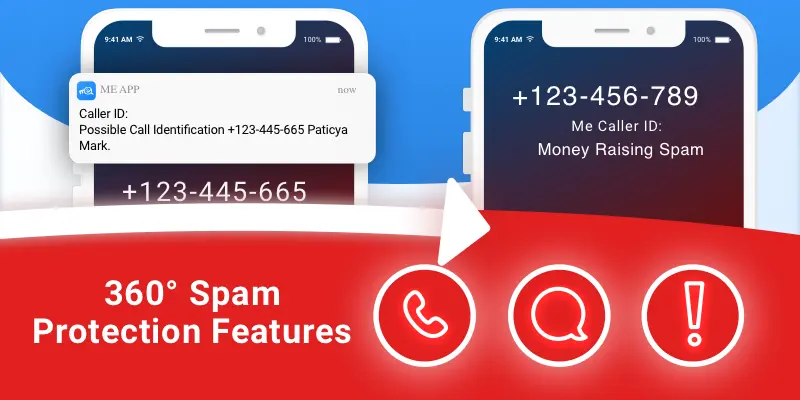
How to stop spam calls comes down to three things working together: an app that recognizes spam and warns you before you answer, blocking numbers and types of calls on the phone itself, and, in the US, putting your number on the National Do Not Call Registry so legitimate telemarketers have to leave you alone. None of them stops everything on its own. The registry does nothing against scammers, and blocking one number does nothing against the new number that calls tomorrow. Together they cover almost every kind of unwanted call, robocalls included.
The short version
- Android: set Me as your default caller ID and spam app, then use Me's blocking settings to block numbers, private numbers and whole countries.
- iPhone: go to Settings › Apps › Phone › Call Blocking & Identification and turn on Me. The spam warning appears while the phone is still ringing.
- Sales calls from companies (US): register your number for free at donotcall.gov.
- Recorded sales pitches (robocalls): illegal in the US unless you gave the company written permission, and you can report them.
- Got a spam call: don't answer, don't call back, and report the number in Me so the next person gets a warning.
Why do I get so many spam calls?
Spam calls come from three main sources: telemarketing companies working through lists of numbers, autodialers that call thousands of numbers and play a recorded message, and scammers who pretend to be your bank, a delivery company, a credit card issuer or a government agency. Your number reached them through a form you filled in, a sweepstakes entry, a data breach, or simply a machine dialing every number in your area code.
Blocking a single number doesn't help for long, because these callers buy new numbers in bulk, use each one for a short time and move on to the next. That is also why a number Me doesn't recognize is, in most cases, a new number bought in bulk for sales or scam calls, and most likely spam. One more thing: every time you answer, the caller learns that your number is live, and that brings more calls.
How to stop spam calls on Android
- Set Me as your default caller ID and spam app. Android lets only that app identify an incoming call and reject it before it rings. If it isn't set yet, Me will ask for it, and setting up Me on Android takes about a minute.
- See a warning before you answer. When users have reported a number, Me shows on the call screen that it's a spam call and how many users reported it. You decide before you pick up.
- Block a number that keeps calling. Open the number in Me and choose Block this Phone Number, or Report as spam and block to report and block in one step. If Me asks for an extra permission to block, allow it. Every number you block is listed under Blocked numbers in the blocking settings.
- Block private numbers. Tap the Me logo › Settings › Blocking Settings and turn on Block calls from private numbers. A hidden number can't be identified, because no number reaches your phone at all, but you can block every one of those calls with a single switch. More in our guide to No Caller ID calls.
- Block countries. Getting spam calls from abroad? On the same screen, under Blocked Countries, choose the countries you have no ties to. Contacts saved on your phone still ring through. Full steps in our guide to blocking international calls.
 James WalkerView My Profile
Light modeDark Mode


 +3 new
Deleted your contact
Turn ON
You can also block a single number from your phone's own call log by long-pressing it. The option names vary from one phone maker to another, but the block itself works the same way.
How to stop spam calls on iPhone
- Turn on Me in your iPhone's caller ID settings. After installing Me, go to Settings › Apps › Phone › Call Blocking & Identification and turn on Me (on older versions of iOS: Settings › Phone). You only do this once. Full details on our iPhone caller ID page.
- Spam warning while it rings. A number that users have reported shows up with a spam warning while the phone is still ringing, without opening any app.
- Block a number. In Me, open the number and choose Block this Phone Number. You can also do it from the iPhone itself: in Recents in the Phone app, tap the number or the info button next to it, scroll down and tap Block Caller.
- Private numbers and unknown callers. iPhone has no switch that blocks only hidden numbers. What it has is a system option for unknown callers: Settings › Apps › Phone, then Screen Unknown Callers on iOS 26, or Silence Unknown Callers on earlier versions. It applies to every number that isn't saved on your phone, including the delivery driver and the doctor's office, so turn it on only if you rarely get calls from new numbers.
The National Do Not Call Registry: how to sign up and what it stops
The National Do Not Call Registry is a free list run by the Federal Trade Commission (FTC). Telemarketers have to check it, and once your number is on it, companies selling something are not allowed to call you.
- How to sign up: go to donotcall.gov, or call 1-888-382-1222 (TTY 1-866-290-4236) from the phone you want to register. It's free, and cell phones are registered exactly like home phones. If you sign up online, click the link in the confirmation email within 72 hours.
- When it starts working: your number shows up on the registry the next day, but it can take up to 31 days for sales calls to stop. The registration never expires.
- Who can still call: political campaigns, charities, debt collectors, purely informational calls and surveys, none of them allowed to include a sales pitch. Companies you've recently done business with, or gave written permission to call, can call too, but if you ask them to stop, they have to.
- A company called anyway: report it at donotcall.gov, with the date and time and the number that called.
What the registry doesn't stop: scammers. They don't check any list, and the FTC itself says the registry won't stop illegal calls from scammers. For those you need the identification and blocking on your phone.
Outside the US, most English-speaking countries have their own list: the Telephone Preference Service in the UK, the National Do Not Call List in Canada and the Do Not Call Register in Australia.
Robocalls and the law: what's illegal and when you can sue
A call that plays a recorded sales message is a robocall, and in the US it is illegal unless the company got your written permission to call you that way. Purely informational robocalls and debt collection calls are allowed, but a robocall offering to lower your debt is not. The federal law behind these rules is the Telephone Consumer Protection Act (TCPA), which also bars calls to cell phones from autodialers or with a prerecorded voice without your prior consent.
The TCPA lets you sue. For an illegal robocall you can claim your actual loss or $500 per call, whichever is greater, and a court can triple that if the violation was willful. If your number is on the Do Not Call Registry and the same company calls you more than once within 12 months, you can claim up to $500 per call, also up to triple if willful. A court decides the actual amount, and your state may have additional rules.
To have a case, keep records: a screenshot of your call log with the number, date and time, and if possible a note of what was said and the name of the company. This is general information, not legal advice.
How to report spam calls
Reporting takes a second, and every report in Me updates the warning for other users too. So it's worth reporting even if you didn't answer.
Me identified 11 numbers
- “Tax scam”+1 (415) 555-0188 SpamToday | 10:52
- Maya Brooks+1 555-0147 CameraToday | 10:53
- Nora Whitaker+1 555-0174 DialerToday | 09:40
- Daniel Reyes+1 555-0118 SearchToday | 08:12
- Owen Castellano+1 555-0167 Recent CallsYesterday | 19:05
- Chloe Bennett+1 555-0129 VoIPYesterday | 14:22
- Possible spam+1 555-0193 SpamYesterday | 11:02
- Ethan Price+1 555-0152 SearchThursday | 17:30
- Grace Holloway+1 555-0136 Recent CallsWednesday | 12:48
- Lucas Meyer+1 555-0185 CameraTuesday | 09:15
- Sofia Turner+1 555-0141 DialerMonday | 20:06


 Place your comment SophiaNov 14, 2026
They offered me a crypto investment with guaranteed returns. Don’t pick up!
 SophiaAnonymous
Your name and photo will be shown on your commentYour name and photo will be hidden
Save
Cancel
The simplest way, the same on Android and iPhone: open the number's profile in Me, tap Yes, it’s a spam when it asks Is it a spam?, and if you like, leave a comment that tells others what this number wanted.
How to block a spam number
At the bottom of a spam number's profile in Me there is a red button, Report as spam and block. Check Block contact and tap Block contact, and the profile turns dark with the line This number is blocked. From now on, the number can't call you or send you text messages.
 Place your comment AvaNov 14, 2026
They offered me a crypto investment with guaranteed returns. Don’t pick up!
AvaAnonymous
Your name and photo will be shown on your commentYour name and photo will be hidden
Save
Cancel
Download Me for free for Android and iPhone
More ways on Android
- While the call is ringing: on Me's call screen, tap Mark as spam.
- After the call: on the call summary screen, tap the spam report. Once the report goes through, you'll see Spam Report Received.
- Report and block together: open the number in Me and choose Report as spam and block.
Another way on iPhone
In Recents in the iPhone Phone app, swipe right on the call and report it through Me. This works once you've turned on Me in Call Blocking & Identification.
Beyond the app
- Unwanted sales calls or robocalls, no money lost: report them to the FTC at donotcall.gov.
- A scam, or you lost money: report it at ReportFraud.ftc.gov.
- Robocalls and spoofed numbers: you can also file a complaint with the Federal Communications Commission (FCC).
In every report, include the number shown on your caller ID, any callback number you were given, and the date and time of the call.
What not to do when a spam call comes in
- Don't press any key during a recorded message, not even "press 9 to be removed from our list". Pressing a key only confirms that your number is live, and in scams it connects you to the scammer.
- Don't call back an unfamiliar number, especially an international call that rang once. Some of these calls exist exactly for that, and calling back a premium-rate number costs money.
- Don't give anyone who called you a verification code you got by text, a password, your card details or your Social Security number.
- Don't install an app or tap a link the caller sends you during the call.
- Don't trust the number on the screen. A caller's number can be faked so it looks like a government agency or a local number with your own area code. This is called spoofing.
Already answered a suspicious call? What happens when you pick up, and what to do next, is covered in our guide to an unknown number calling you.
How Me helps stop spam calls
Me shows the caller's name on the call screen before you answer, and flags unwanted numbers in two stages:
- Suspected spam: an algorithm behind the scenes spots the suspicious behavior of new numbers bought in bulk, and marks them as suspected spam right away, before anyone has reported them.
- Spam: once enough users report a number, it's marked as spam for everyone.

Caller ID in Me is free on Android and iPhone. On Android you also get private number blocking and country blocking. Missed a call from a number you don't know? Here's how to find out who called you.
Download Me for free for Android and iPhone
Frequently asked questions
How do I stop spam calls?
Combine three things: an app that warns you about spam before you answer, blocking for numbers that keep calling and for hidden numbers, and, in the US, registering on the National Do Not Call Registry against telemarketing. And with every such call: don't answer, don't call back, and report it.
How do I block spam calls on iPhone?
Install Me and turn it on in Settings › Apps › Phone › Call Blocking & Identification. A number reported as spam shows up with a warning while the phone is still ringing, and you block the numbers that keep calling in Me or in the iPhone's Recents.
How do I block spam calls on Android?
Set Me as your default caller ID and spam app. Then block numbers in Me, and in the blocking settings turn on Block calls from private numbers and choose countries to block if you need to.
Does the Do Not Call Registry stop spam calls?
It stops sales calls from legitimate companies, which have to check the registry before calling. Scammers ignore it, so against them you need identification and blocking on your phone.
Can I sue over robocalls?
Yes, in the US, for a robocall you never gave consent to: under the TCPA you can claim your actual loss or $500 per call, up to triple if the violation was willful. For repeated sales calls after you registered on the Do Not Call Registry, you can also report the company at donotcall.gov.
Can I block private or No Caller ID calls?
Yes. On Android, in Me: Settings › Blocking Settings › Block calls from private numbers. On iPhone, with the system option for unknown callers. A hidden number can't be identified, because no number reaches your phone.
I blocked a number and now they call from a different one. Why?
Because spammers buy numbers in bulk and switch them constantly. That's why blocking a single number isn't enough, and what helps is a warning based on user reports and on spotting new, suspicious numbers.
Do Me's caller ID and spam warnings cost money?
No. Caller ID in Me is free, and so are the spam warnings and reporting numbers.